





GigaMove
Simple data exchange with GigaMove
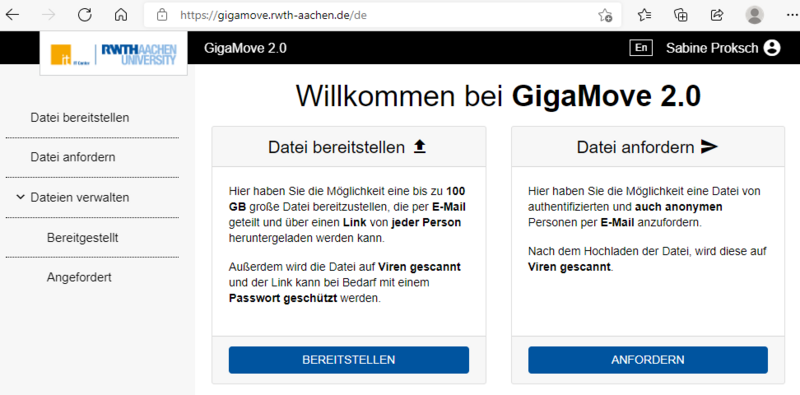
We all know the problem: You want to exchange a large file such as a print template or measurement data with an external partner, but an e-mail attachment is not sufficient for the data size. An exchange via an ftp server or the network drive requires a user account that the partner does not have.
With GigaMove, you can provide external partners with files up to 100 GB in size and also offer an upload option for large files. This means that nothing stands in the way of bidirectional data exchange.
Log in to GigaMove
If you are prompted to do so, select the University of Würzburg as your organisation and log in with your JMU account and password.
Provide a file
If you want to give someone access to a large file, select the"Provide file" option. You can then upload a file to the system and receive a link that you send to your partner by e-mail. They can download the file via the link in the email. Optionally, you can secure the download with a password, which you must then also provide to your partner.
Requesting a file
If your partner would like to send you a large file, select the"Request file" option. You will then receive a link that you can send to your partner by e-mail. When they open it, they will be shown a simple form which they can use to upload their file for you. GigaMove will then inform you by e-mail that a file is ready for you.
Manage files
Here you have an overview of the files you have provided and requested. You can send the e-mails with the download link directly, set a new expiry date or edit the download password.
General conditions
Please note that GigaMove is only intended for data exchange. The files are therefore automatically deleted after one week. This period can be set as an option; the maximum storage time is 14 days.
Files up to a size of 100 GB can be exchanged in both directions without having to give the partner a login to any file or FTP servers. Each user of the University of Würzburg has a total of 1 terabyte of memory available on this system.
Documentation and FAQ
Here we refer directly to the documentation portal IT Centre Help of RWTH Aachen University and to their blog article GigaMove 2.0 - Exchanging larger amounts of data " IT Center (rwth-aachen.de)
RWTH Aachen University would be pleased to receive feedback, questions and suggestions. Please send them to servicedesk@rz.rwth-aachen.de.
Data exchange within the university
Files can also be exchanged within the university via the central network drives.
Background and data protection
In cooperation with the German Research Network (DFN) and the Aachen University of Technology (RWTH Aachen), the Computer Centre provides all members of the University of Würzburg with a simple, user-friendly and secure way of exchanging large files. The service is operated by RWTH Aachen University.
The data is exchanged via an RWTH Aachen server, access is via a web interface via semi-anonymous access and is therefore only partially secure in principle. Therefore, do not use this service for confidential data or encrypt the files in advance.
After your registration, the computer centretransmits the following user attributes to RWTH Aachen University: User name, first and last name and e-mail address. If you do not agree to this, please do not use this service.




