





Firewall
The IT Service Center operates a firewall at the transition between the Internet and the university network. This only allows incoming connections from the internet to explicitly authorised services ("whitelisting"). All access that is not explicitly authorised is blocked. For outgoing connections to the internet, only a few dangerous services are explicitly blocked ("blacklisting") so that students and staff can work without any noticeable restrictions.
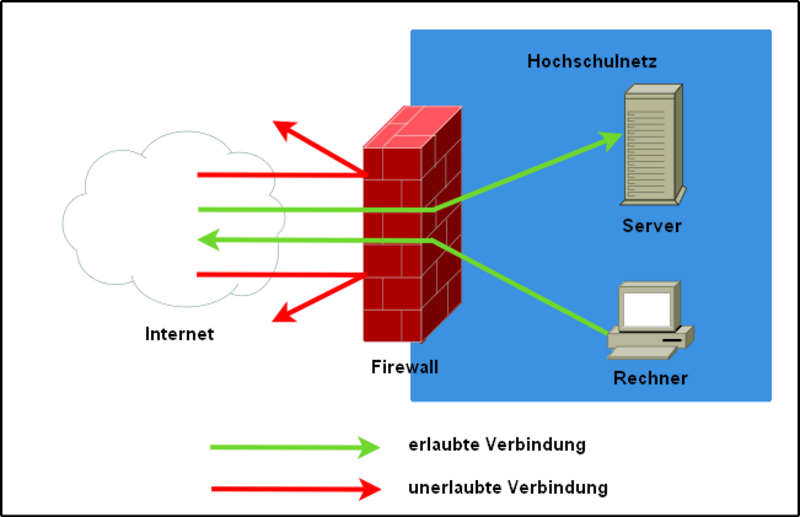
The firewall works according to the principle of a packet filter, which is also capable of so-called "stateful inspection". This means that the properties of outgoing data packets are assigned to a state and stored in corresponding state tables on the firewall. Incoming data packets are then compared with the tables and, if a matching state is present, are accepted and forwarded via the firewall. If there is no corresponding entry in the state tables, a search is made for access control lists that explicitly allow the incoming data packet. If no suitable rule exists here either, the data packet is blocked at the firewall.
Rules for data traffic
The ports blocked from the university network are listed individually.
- Port 25 (SMTP)
- Port 53 (DNS)
- Ports 135, 137-139, 445 (Microsoft network services)
- Ports 161, 162 (SNMP)
- Port 593 (HTTP RPC Ep Map)
In principle, all incoming ports are blocked unless a port activation has been explicitly requested. However, the following ports cannot be requested for activation for security reasons:
- Port 25 (SMTP)
- Port 53 (DNS)
- Ports 135, 137-139, 445 (Microsoft network services)
- ICMP
- Insecure protocols with plain text passwords, esp:
- Port 23 (Telnet)
- Port 110 (POP)
- Port 143 (IMAP)
- Port 3389 (RDP)
- Port 5900 (VNC)
Note: One way of still being able to access systems within the university from the Internet using one of the insecure plain text protocols is to use the VPN client. This establishes an encrypted data connection with the IT Service Centers's VPN gateway. Once this has been done, the subsequent communication is completely encrypted through this VPN tunnel and reading of the plain text passwords is prevented. Further information on using the VPN can be found on this website
Another secure alternative is an SSH jump server that may be available in the respective department. Here, too, an encrypted data connection is established, but only the data traffic forwarded via SSH is encrypted, not the entire data traffic of the computer. Instructions for operating an SSH jump server or using an SSH client are provided here.
Furthermore, it is highly recommended to use a modern secure variant instead of one of the old plain text protocols. For example, SSH should be used instead of Telnet, or IMAPS instead of IMAP. Such systems can then be made directly accessible via port activation.
Request for (port) activation
Employees and network managers who wish to authorise a computer in their department for access from the Internet must apply for it to be activated. This is authorised by the IT department manager responsible for the respective department.




