





Spam, phishing, viruses, Trojans & Co.
The flood of unsolicited spam and phishing emails continues to increase, causing damage to system operators and users. Unsolicited e-mails - which we summarise under the generic term spam/phishing - are diverse:
Trojans and viruses in email attachments are designed to get the user to open the attachment and infect the PC with malware. This allows criminals to spy on the computer, access and misuse data. Malware can be hidden not only in attachments, but also behind links in emails.
Phishing emails are fraudulent emails that criminals use to trick recipients into disclosing personal data such as passwords, access data, bank details and credit card numbers. They speculate that the unsuspecting recipient will fall for the disguised email, not recognise any danger and provide their data voluntarily.
Spam mails are unwanted, often purely advertising mails that are sent to you unsolicited. They are sent in the form of mass emails to thousands of users and are pure data rubbish that puts a strain on mail systems.
The aim ofscamming is to obtain money from the victim. For example, the prospect of millions in profits is promised, but these are only paid out after a fee has been paid. Financial emergencies can also be feigned in order to persuade victims to pay money. This also includes threatening and blackmail emails that intimidate victims and demand money.
In so-called "CEO fraud", emails are sent in the name of superiors and managers asking recipients to buy and pass on gift card codes (e.g. Apple Gift Cards). They often pretend that the sender is travelling and is therefore using a private email address. The emails emphasise urgency, often request confidentiality and refer to a special relationship of trust in order to persuade the recipient to buy and pass on the gift card codes. Always question such requests and contact the alleged sender directly and by other means if you are unsure.
Anti-spam measures of the computer centre
The computer centre uses effective anti-spam mechanisms to filter out and block unwanted emails as effectively as possible. The aim is to protect the university's data and systems. Despite all measures, however, we cannot prevent obvious spam/phishing emails from remaining unrecognised and being delivered to users.
Conversely, valid emails can also be incorrectly categorised as spam/phishing emails. Unless they are Trojans, the emails are delivered to the mailbox in a new email and can be viewed by the user. Further information can be found on the topic page Junk e-mail handling.
Greylisting uses the data centre as a central element in the fight against spam: the delivery of emails from suspicious sources is delayed and spammers are slowed down.
If you have received an e-mail that seems suspicious, make sure you handle it with care:
- it is best to delete it unopened
- Do not open any attachments
- Do not click on any links
- Do not reply to suspicious e-mails
- If you have any doubts as to whether an email is legitimate, ask the sender
- Never disclose personal data such as your password or login details
The computer centre will never ask you to send access data by e-mail. Never send access data by e-mail!
If you frequently receive spam/phishing emails, check whether your identity may have appeared publicly on the Internet. Further information on our website Datenleak.
If you have inadvertently clicked on a dubious link in a phishing email or opened an infected attachment, further measures must be taken. Find out what to do in such a case on our page Measures after an IT security incident.
Fraudsters are becoming increasingly sophisticated and manipulate spam/phishing emails so skilfully that users often do not even recognise them as such. Cyber criminals use tricks to make an email appear trustworthy in order to then steal your personal data or install malware on your PC without you realising.
- They pretend to be from a reputable sender: You think the email is from a person you know and open the email. The message source (source text) provides more information about the real sender, although the message sources are very technical and laypersons are usually unable to interpret them.
- The subject indicates a legitimate e-mail: Mail Quota Exceeded, Verify your email addresses. Consider whether the request is plausible.
- Links in the e-mail refer to fake websites that look very similar to the original. You can often see the real address by simply positioning the mouse over the link.
- Links in e-mails are replaced by short URLs, disguise the dubious URL and lead to manipulated websites.
- Links and attachments contain viruses and Trojans that install malware when clicked on.
- The emails are well worded and have hardly any linguistic flaws
- Application Trojans: Emails that look like a legitimate application on the outside, attachments are disguised as a CV or application and contain viruses and Trojans
If in doubt, it is better to delete a suspicious e-mail. For important e-mails, you can also simply ask the sender - with a new e-mail or by telephone.
You can report a suspicious email to us, which may also be dangerous for other users.
Please forward us the spam/phishing email AS AN ATTACHMENT to phishing@uni-wuerzburg.de.
Only then will we have the email header of the spam/phishing email, which we can analyse and take preventive measures.
This is how forwarding as an attachment works:
Thunderbird: Select the email in the inbox - right mouse click - Forward as - attachment
Outlook: Select the email - "Start" tab at the top - "More" button (= symbol to the right of Forward) - Forward as attachment
Apple Mail: Mark email in inbox - right mouse - Forward as attachment
Outlook on the web: Write a new email. Drag and drop the spam/phishing email from the inbox menu into the new email.
Apart from an automatic reply, you will not usually receive an individual response from us. The message will nevertheless be included in our anti-spam measures.
The Computer Centre does not take any steps to report threatening, blackmailing and other illegal e-mails.
If you have any questions regarding criminal investigations, please contact the JMU Legal Department.
If you are repeatedly bothered by unwanted emails from certain senders, you can add the sender address to the junk or block list (exclusion list, blacklist) in your mail programme yourself. Depending on the configuration, the unwanted emails are deleted, moved to a junk folder or not delivered at all.
The emails accepted by the university's incoming mail servers are subjected to a spam assessment. The SpamAssassin tool is used to check the probability of spam and an additional header line is added to the body: X-Spam-Level: *******
The number of stars is a measure of the probability that it is a spam mail. The more asterisks, the more likely it is to be a spam mail. You can evaluate this value using filter rules in your mail programme and improve your spam defence.
Unfortunately, the spam evaluation cannot decide precisely whether it is a wanted mail or an unwanted spam mail, but can only make an evaluation according to heuristic procedures.
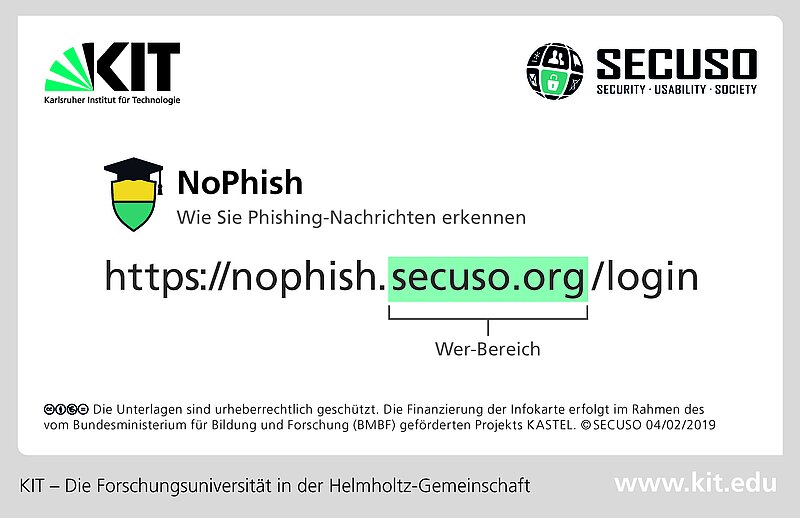
- Rule: Check the sender and content of every message for plausibility.
- Rule: Familiarise yourself with where you can find the actual web address behind a link (e.g. on the PC or laptop in the tooltip or in the status bar).
- Rule: Identify the who area (highlighted in bold and colour).
- Rule: Check whether the Who section matches the (supposedly) legitimate message and is written correctly.
- Rule: If you are unable to clearly assess the Who section, you should obtain further information, e.g. using a search engine.
- Rule: Check the file format of the attachment.
- Rule: If you cannot clearly assess the attachment or are unsure whether you expect exactly this format from the recipient, you should obtain further information, e.g. by contacting them. Do not use the contact details from the message for this.
Source: Recognising phishing and other fraudulent messages from SECUSO
For further information on the subject of spam and phishing, we recommend the BSI website for citizens - search term spam or phishing and the SECUSO (Security - Usability - Society) research group.
We would also like to take this opportunity to refer you to the online courses on IT sensitisation offered by the Professional Development Unit, including information on the topic of "Spam and phishing emails".
German explanatory videos
Check sender & recognise dangerous attachments
English explanatory videos
Verifying sender & detecting dangerous attachments
Further materials




