





Mailing lists
JMU staff and students can apply for mailing lists for official or student purposes. New mailing lists are created on the DFN listserver created. In the case of a mailing list on a listserver, members are maintained directly on the listserver by the list owner or by subscription by the user, it can contain any mail addresses as members and has an archive. The application is made using the application forms in the blue boxes below.
Alternatively, you can also use Exchange mailing lists. Exchange mailing lists are generated from the members of a user portal group, the members are maintained by the administrator of the group in the user portal. Only JMU accounts with an Exchange mailbox can be included and there is no archive. For details see Exchange mailing list.
On 29.07. the mailing list server of the computer centre was switched off.Regular mailing lists including all memberships have been migrated to the list server of the DFN-Verein. Group-based mailing lists must be applied for again by the list administrators as Exchange mailing lists. Exchange mailing lists.
You do not need an account with DFN to receive all mails as before!
If you would like to know in which mailing lists on the DFN listserver your e-mail address is registered, you can optionally create an account there. To do this, go to the DFN website https://www.listserv.dfn.de/sympa, click on "Register" in the top right-hand corner and then on "First registration?". You can then find the lists you have subscribed to by clicking on your name in the top right-hand corner and then on "My lists".
All necessary information for list owners/administrators can be found below.
Request a mailing list
- Newsletter - only selected people are authorised to post, which means that only they are allowed to send emails to the members of the list. You can specify who is authorised to post when you apply for the list. Changes can be made later.
- Discussion forum - all list members are authorised to post.
The administrator is always authorised to post.
Click on one of the boxes if you want to request a list. You must be logged in with your JMU account.
Details on the new DFN listserver
The listserver of the DFN-Verein is based on the Sympa software, which has better functionality and a more modern user interface than the old RZ listserver.
Changes for list users
- The e-mail address of a list is now jmu-<listenname>@listserv.dfn.de instead of <listenname>@lists.uni-wuerzburg.de as before
- All mails via the list come from the DFN listserver and are marked with [EXT]
Changes for administrators
- Registration in the DFN portal is required for administration. To do this, go to the DFN website https://www.listserv.dfn.de/sympa, click on "Login" in the top right-hand corner and then on "First login?".
- Lists on the DFN listserver are managed via https://www.listserv.dfn.de/sympa/my or click in the DFN portaltop right on your name and then on "My lists"
- You can find detailed documentation from DFN at https://www.listserv.dfn.de/sympa/help
- Senders of mails to lists that have been moved will receive a message asking them to send the mail to the new address of the mailing list
Administration of the DFN mailing lists
As soon as the mailing list is set up, the administrator receives a notification e-mail. The new list is then automatically displayed in the DFN portal under "My lists".
The administrator can configure the mailing list via the admin interface. The handling on the "List main page" at listserv.dfn.de/sympa/info/listenname is intuitive and offers the most important settings at a glance:
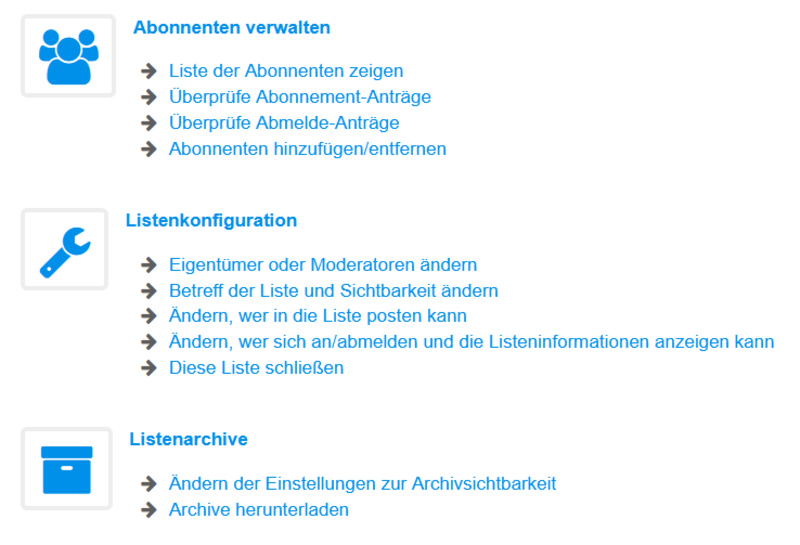
- Log in to the admin interface and open the mailing list via "My lists"
- Under "List configuration" ⇒ "Change owner or moderator"
- Add owner or click on "Users" > "Moderators" > Add moderators
- Save changes
- Log in to the admin interface and open the mailing list via "My lists"
- Under "List configuration", click on "Change who can post to the list"
- Under the item "Who can send messages"
- If you have set "Newsletter, restricted to owners" here, for example, authorised posters must be entered as owners
- Save changes
All posts and requests for approval are sent to the administrator by email. Please read the emails carefully as the reason for moderation is stated e.g. new subscription request, email too large or email from a non-member awaiting approval. Each email contains the link to the admin interface to approve or reject the request.
Alternatively via:
- Login to the admin interface
- all moderation options are accessible by clicking on "Moderate" in the left navigation menu
An archive is automatically created for each list. You can find the archived posts under
- Log in to the admin interface and open the mailing list via "My lists"
- Click on "List archives"
Subscribe:
- Log in to the admin interface and open the mailing list via "My lists"
- "Manage subscribers"
- Enter the email addresses of new members under "Add subscribers"
- Save with "Add"
Unsubscribe:
- Log in to the admin interface and open the mailing list via "My lists"
- "Manage subscribers"
- At the bottom you will see the "Subscribers table"
- Tick the box next to the subscribers you wish to remove
- "Delete selected email addresses"
You can access the user interface at https://www.listserv.dfn.de/sympa/info/<list></list>. Replace <list> with the list name.
Users can request a subscription via the user interface.




