



Conversion to standard mail address - functional account
Following consultation in the ITBG , it was decided in October 2022 to discontinue subdomains in mail addresses and guidelines for functional mail addresses.
Existing primary mail addresses with sub-domains, such as @jura.uni-wuerzburg.de, will be successively adapted to the new standard format.
Important: the previous e-mail address will remain as an alias so that you can continue to receive e-mails to this address.
All affected functional accounts will be informed individually by e-mail in advance about the upcoming changeover.
What users need to bear in mind after the changeover:
Outlook für Windows

Sie müssen nach der Umstellung im Outlook Client den bisherigen Funktionsaccount löschen und neu einbinden.
Löschen: markieren Sie dazu links im Menü das Konto und löschen bzw. schließen Sie es.
Anschließend können Sie in Outlook den Funktionsaccount als weiteres Konto hinzufügen. Infos unter Einbinden eines Funktionsaccounts
Outlook im Web

Für Outlook im Web https://mail.uni-wuerzburg.de ist keine Anpassung notwendig. Die Absendeadresse ist automatisch die @uni-wuerzburg.de Mailadresse.
Outlook für Mac

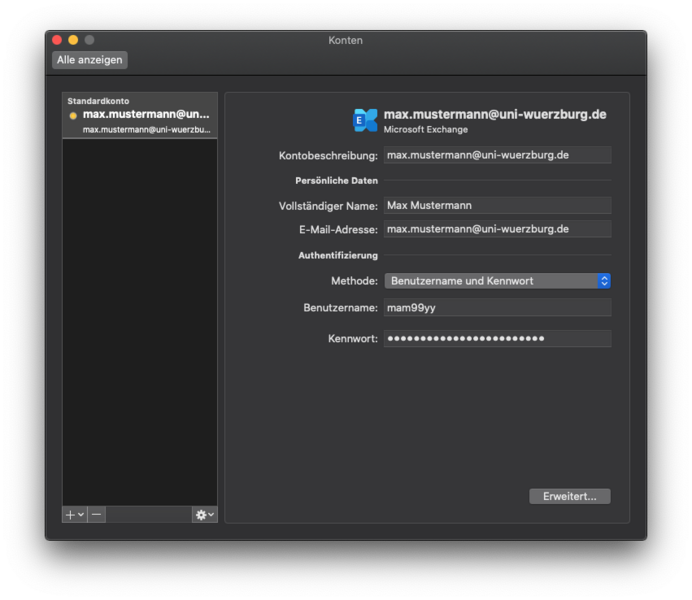
Sie müssen Ihre E-Mail-Adresse und die Konten-Bezeichnung an die neue Mailadresse anpassen.
Anleitung:
- Outlook starten
- Extras - Konten - Uni Konto auswählen
- Kontobeschreibung und E-Mail-Adresse auf die neue Mailadresse @uni-wuerzburg.de ändern
- Benutzername ist Ihre JMU-Account oder Ihre neue @uni-wuerzburg.de Adresse
Ihre Absendesadresse ist künftig Ihre @uni-wuerzburg.de Mailadressse.
If you cannot retrieve the emails, check the settings in the email account on your smartphone.
The user name is your @uni-wuerzburg.de email address or <jmu-account>@uni-wuerzburg.eu (<jmu-account> is your user name, e.g. mar20xv@uni-wuerzburg.eu)
Alternatively, you can also delete the e-mail account on your smartphone and reintegrate it. You can find the instructions at the bottom of the Exchange topic page
You must adjust your e-mail address and the account name to the new e-mail address.
Instructions:
- Start Thunderbird
- Extras
- Account settings
- Change the account name and e-mail address to the new e-mail address @uni-wuerzburg.de
In future, your sender address will be your @uni-wuerzburg.de e-mail address.
- When you write to the list, the system checks whether your sender address matches the one entered in the mailing list. However, as you now have a different sender address, this must be adjusted in the mailing list.
- Contact the mailing list administrator and ask them to adjust your posting-authorised mail address (this can be the moderation flag in the member list or under the configuration category "Subscription rules and address filters" - "Sender filter" - "Address list of non-members whose messages are automatically accepted").